
Introduction #
The problem #
I use multiple AI models daily: ChatGPT for everyday questions and research, Claude for helping me understanding code. But I also wanted to try Gemini and DeepSeek (not just in the free plan). Paying a premium subscription for every single one of these would be expensive - for example, monthly costs (as of December 2025):
- Claude Pro: 21,42 €
- ChatGPT Plus: 23€
- Google AI Plus: 7,99€
In summary I would have to pay at least around 52€ per month - of course I could just stick to the free plans, but I get to the limits pretty fast.
My solution #
Then I heard about OpenRouter (big shoutout to my teamlead for telling me about this). OpenRouter gives me the possibility to access hundreds of models at the same time, by just having to pay what I actually use. The payment is based on the usage of tokens (explanation here), which is (for me) quiet cheaper every month (about 10€ to 20€). Also, if I have months, were I nearly dont use the AI, I dont have to pay anything. OpenRouter combined with OpenWebUI is awesome! Feel free to follow this guide, if you want to set it up by yourself.
Bonus: Protect personal data #
If you want to protect personal data when using AIs in OpenWebUI, look into my guide about “Pasteguard” - a tool, which does exactly that:
You can find the configuration for OpenRouter at the end of the guide.
Requirements #
- Account at OpenRouter
- Server to host OpenWebUI
- Docker installed on the server
It is 100% possible to use OpenRouter without OpenWebUI, but I prefer it.
Setup #
OpenRouter #
- Create an account at OpenRouter and login.
- Access your account settings:
-
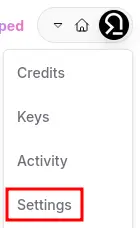
- Open the section “API Keys”:
-
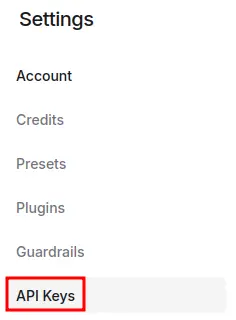
- Create a new API Key (change the settings to suit your needs) and save it!
- Now, switch to “credits”:
-

- Buy some credits. You can start low, for like 5€ - more than enough for testing. Disclaimer: OpenRouter has a fee for the usage of their services - 5.5% of the amount of the credits you buy.
OpenWeb UI #
- Access your server and install Docker, if you dont have it already installed. There are plenty of instructions online for every type of OS, so I wont explain it here.
- Create a new “docker-compose.yml” and insert the Docker Compose of OpenWebUI. Example docker-compose.yml (from the offical docs):
-
services: openwebui: image: ghcr.io/open-webui/open-webui:main ports: - "3000:8080" volumes: - open-webui:/app/backend/data volumes: open-webui: - Start the service with
docker compose up -d - After installing, visit http://localhost:3000 to access Open WebUI on the server. If you want to access it from a client, type in the IP-Adress of the server and the port 3000, for example: http://192.168.178.13:3000.
- Create an account and login
- Go to the Admin-Panel:
-
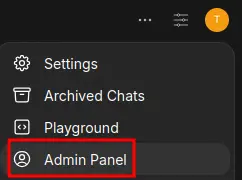
- Switch to the section “Functions” and click on “+ New Function” on the top right. Choose “Import From Link” and paste this link:
https://openwebui.com/f/preswest/openrouter_integration_for_openwebuiand import it:
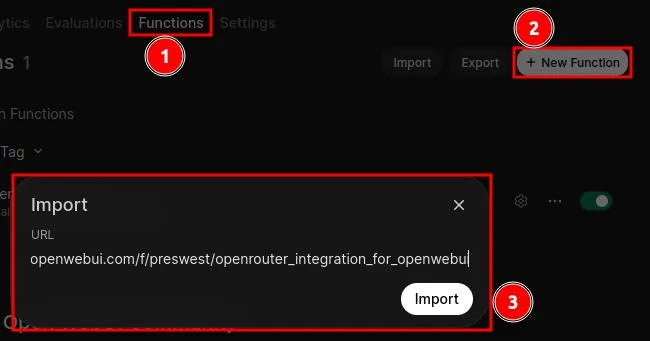
- A new Function “OpenRouter Integration for OpenWebUI” will be created. Save it with the Save-Button on the left bottom.
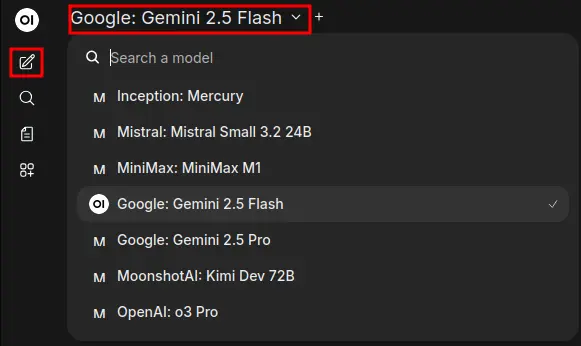
- Now you should be able to choose from a model on the top of the chats!:
-
Nice to know #
You can see your Token usage in OpenRouter, to get a feeling of how much your requests cost. If you want to save Tokens, enter a System-Prompt that tells the AI to answer brief and concise and dont use emojis or clichés. We dont need the AI to spend tokens on telling me, that my question is great with 10 different emojis.. I am not a “Prompt-Pro”, try to build your own System-Prompt by your desires. You can enter it in the Chat settings of OpenWeb UI:
Also, ask your questions short and specifically, if you want to use even less tokens. You dont have to say “Thank You”, which also would use tokens - this article from the New York Times helps understanding why: Saying ‘Thank You’ to ChatGPT Is Costly.