
Zabbix docker image updates monitoring
Introduction #
I created a Zabbix template to monitor updates of docker images a year ago and always disliked one thing about it: it could not show the name of the available updates. It just showed the count of all available updates on a host like this:

Now I finally had time to create a second template using Zabbix “LLD” (low level discovery) to determine the name of the available image updates and display them in the generated problem in Zabbix.
Every available update is now one problem with the name of the container, like this:
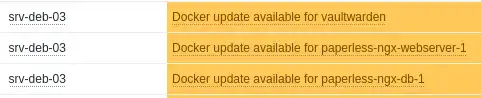
So now, the repository for the template is split into two sections:
- zabbix-dockcheck-simple - just shows the count of all available image updates
- zabbix-dockcheck-lld - shows the name of the available update
The old template did not get ditched, I thought someone may like it more to just see the whole number of available updates - so now, you can choose between them!
The whole template is based on “dockcheck.sh” and was tested with:
- Zabbix Server 7.0.5 and 7.2
- zabbix-agent2 (on Debian 12 server)
Mag37 (the creator of dockcheck.sh) was even so kind to mention the template in the official Github repository: Github - mag37/dockcheck (and yes, I am a little bit proud of this).
Installation Guide #
You can find the installation guide in the Github repository. Quicklink:
About the functionality #
If you are interested in understanding how the template works, read the following short explanation.
The Template uses the dockcheck.sh script from mag37 to get informations about available updates. For this, the output of dockcheck.sh -n get parsed with a little wrapper script, dockcheck-lld.sh.
dockcheck.sh -n gives us content like this:
Containers on latest version:
matter-server
open-webui-openwebui-1
!portainer_agent - not checked, no compose file

Containers with updates available:
homeassistant

No updates installed.
The wrapper script reads this output and parse it to json, which Zabbix low level discovery can understand. In the script the output also gets cached at /tmp/dockcheck_cache.txt. Without this cache file I ran into timeout problems, the check needs a little bit to long for Zabbix to read the output.
The parse of the output looks like this:
    PARSED="$(printf "%s\n" "$CLEAN" | awk '
      function set_status(name, code,   r) {
        if (name == "") return
        r = (code == 1 ? 2 : 1)
        if (!(name in rank) || r > rank[name]) {
          rank[name] = r
          status[name] = code
        }
      }
      BEGIN { sec="" }
      /^[[:space:]]*Containers on latest version:/          { sec="latest"; next }
      /^[[:space:]]*Containers with updates available:/     { sec="updates"; next }
      sec != "" && $0 ~ /^[[:space:]]*$/ { sec=""; next }
      sec == "latest" {
        if ($0 ~ /^!/) next
        if ($0 ~ /^[A-Za-z0-9_.-]+$/) set_status($0, 0)
      }
      sec == "updates" {
        if ($0 ~ /^[A-Za-z0-9_.-]+$/) set_status($0, 1)
      }
      END {
        for (n in status) print n "\t" status[n]
      }
    ' | sort )"
And the conversion to json like this:
printf '{"data":['
first=1
while IFS=$'\t' read -r cname ccode; do
  [[ -z "$cname" ]] && continue
  [[ $first -eq 0 ]] && printf ','
  first=0
  esc="$(printf '%s' "$cname" | sed 's/\\/\\\\/g; s/"/\\"/g')"
  printf '{"{#CONTAINER}":"%s"}' "$esc"
done <<< "$PARSED"
printf ']}\n'
It reads the output and determines, which containers are in the “latest version” section and which are in “updates available”. “Latest” equals 0, “updates” equals 1. Zabbix then read this information and opens a problem for every container with the status “1”.
The file “dockcheck-lld.conf” in the directory “/etc/zabbix/zabbix_agent2.d” helps Zabbix to read the output:
UserParameter=dockcheck[*],/etc/zabbix/scripts/dockcheck-lld.sh $1 $2
$1 is the name and $2 the status of the container (latest / update).
Inside of the Zabbix template, this data will create an item for each container with its status (thanks to the discovery rule), which then is processed inside of a trigger.
The trigger then finally determines, if it creates a problem or not (using the status).
Conclusion #
I hope that this script helps some people, which also did not find a template to find available docker image updates.
If you have any suggestions for improvement, ideas, or problems, please leave me a comment below (no registration necessary). Alternatively, feel free to create an issue in the Github repository.
Best regards