
Introduction #
I was stuck with the following problem: In Orcaslicer, versions up from 2.3.1, gcode files where stuck forever in “Preparation: Parsing” on my Anycubic Kobra 3 Max:
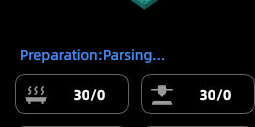
There already are Github issues opened for that problem:
Unfortunately, it seems unfixed, so users may be forced to use the workaround like me.
The Workaround / Fix #
The workaround was found in a comment from issue #12952 from the user avxmw - thanks a lot!
Step by step guide:
- You need this python script from Github: Github - k3m-fix.py. Save it to your computer as
k3m-fix.py. - If you are on Linux like me, make sure to make the script executable with this command:
chmod +x k3m-fix.py - Also make sure to install python3 on your system, if not already available. You can test it’s availabilty on your system with typing
python3into your terminal. If installed, this should open up a python shell. - If not available, look up how to install python3 on your OS - there are plenty of guides available online or through your preffered AI.
- After saving the script and confirming the installation of python3, you can now add the script to the “post-processing scripts” section in Orcaslicer:
- Open the “Others” section in your “Process” tab and scroll down, until you find Post-processing Scripts.
- Paste
python3 /path/to/your/k3m-fix.pyinto it. Make sure to edit the path to the location, where you saved the script. - In my case for example, the command would be
python3 /home/torminal/Programme/k3m-fix.py; -
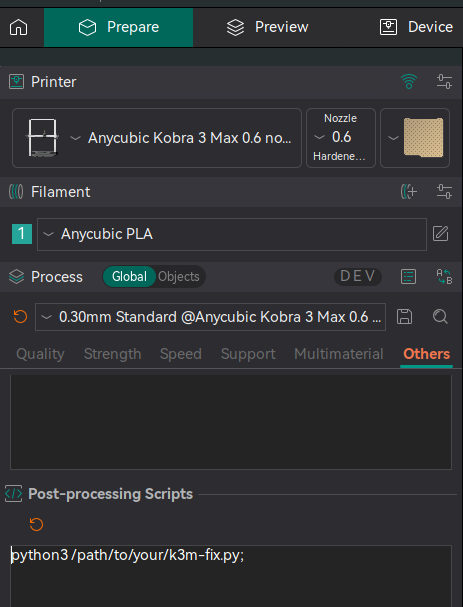
- Now you can export your gcode file as usual and should be able to print again, without beeing stuck in “parsing”!
Conclusion #
This should repair the problem for now. If there is a fix in a new Orcaslicer version for this problem, I will update this guide. Let me know in the comments, if this worked for you, or if something in this guide was missing, so I can update it and help others (no registration for commenting required).